Tuesday, January 5, 2010

Simple 6 steps to run your first Azure Worker Role Program

Simple 6 steps to run your first Azure Worker Role Program


Introduction

In our previous article http://computerauthor.blogspot.com/2010/01/in-case-you-do-not-want-to-read.html .we have seen 5 simple steps to create web role application. Web role projects in Azure are like web applications. Azure has one more type of project i.e. worker role. Worker role applications are back ground processing application like windows process which runs on the back ground. In this article we will try to understand 6 basic steps to create worker role project and as we run through the article we will try to understand the various fundamental methods which are
executed in worker role projects.
If you are really lazy like me you can download my two azure basic videos which explain what azure is all about Azure Faq Part 1 :- Video1 Azure Faq Part 2 :- Video2.

Please feel free to download my free 500 question and answer eBook which covers .NET , ASP.NET , SQL Server , WCF , WPF , WWF@ http://www.questpond.com .

Step 1:- Ensure you have things at place

In case you are a complete fresher to Azure, please ensure you have all the pre-requisite at place. You can read the below article to get the basic prerequisite http://computerauthor.blogspot.com/2010/01/simple-5-steps-to-run-your-first-azure.html

Step 2:-
What will we do?


Worker roles are nothing but back ground process which runs on windows azure platform. We will create a simple background process which will run for X number of times and every time it runs, it will wait for 10000 MS.
Step 3:- Select the worker role template

So create a new project using the worker role template as shown below.
Step 4:- Import namespaces
We need to import two namespaces one is ‘Microsoft.WindowsAzure.Diagnostics’ and ‘Microsoft.WindowsAzure.ServiceRuntime’. Diagnostic will help us to display message using trace on the azure profiler while ServiceRuntime provides functions for azure services.
Step 5:- Create class and override run and onstart method

The next step is to add a class and override the ‘OnStart’ method and ‘Run’ method. In the below code snippet we have created a simple ‘WorkerRole’ class which inherits from ‘RoleEntryPoint’.
We have also defined as simple loop count variable called as ‘intLoops’ which is initialized to value 5. This is value is initialized in the ‘OnStart’ method. ‘OnStart’ method is executed the first time your worker role is executed.

Now override the run method with a simple loop which decrements the loop count and has a thread which sleeps for 10000 MS as every loop is executed.

Step 6:- Run the project and watch the Azure console

Now run the worker role and see your azure console you should see that one worker role instance is running.

We had displayed trace information at various places in start and run method. You can see in the Azure prompt the number of loops executed in Azure diagnostic.
Event=Information,Level=Info,ThreadId=4148,=This is loop number 5
Event=Information,Level=Info,ThreadId=4148,=This is loop number 4
Event=Information,Level=Info,ThreadId=4148,=This is loop number 3
Event=Information,Level=Info,ThreadId=4148,=This is loop number 2
Event=Information,Level=Info,ThreadId=4148,=This is loop number 1

In case you do not want to read the complete article , here are two videos which we have recorded for the same.Azure Faq Part :- Video1 and Azure Faq Part 2:- Video2.

Windows Azure FAQ Part 1


Introduction and Goal

Different people have different obsessions and I have this stupid obsession of writing articles in FAQ formats :-) . The more I try to write articles in normal format I end up with a FAQ. My only thought process of writing articles in FAQ format is that we end up talking to the point rather than talking about trees and rivers , many may disagree.
Carrying my obsession one more step ahead Windows Azure FAQ part I.
Here’s my small gift for all my .NET friends , a complete 400 pages FAQ Ebook which covers various .NET technologies like Azure , WCF , WWF , Silverlight , WPF , SharePoint and lot more http://www.questpond.com/

Thanks , Thanks and Thanks

I am really blessed to be part of Lionbridge SaaS team, the knowledge they brought within me about SaaS is incredible. I would not be writing this article if I was not the part of the team. Here’s nice article from the same team on SaaS http://www.lionbridge.com/lionbridge/en-US/kc/product-engineering/configurability-in-saas.htm .

The article by Modesty zhang really inspired me to write this article, here’s a reference http://www.codeproject.com/KB/silverlight/Azurelight.aspx , thanks for bringing the Azure interest in me.

This does not look like a technical article?

At the initial stages of FAQ we will get acquainted to general vocabularies of Azure and then we will start with all programming stuff.

Quote: - Windows Azure is not a technological change, it’s a business change: - Shivprasad koirala (taking some space to glorify myself J )

If you really ask me Azure is 20% technological driven and 80 % business driven. So if you or your organization is thinking of migrating to Azure, the decision will be management driven rather than technology driven. So the initial stage of the article will talk about cost and need to use azure which will be a bit boring. As this FAQ series moves ahead you will see lot of samples codes, architecture thought process and all the technical blah blah.
I am sure as technological person you need to be aware of how to convince the management when you want to implement a new technology.

What problem does Windows Azure solve?

The best way to define Azure is by understanding what problem it solves. So let’s take a typical organization that has a separate IT department maintaining an online web application. Now let’s try to analyze which different cost factors are involved in maintaining a web application online.

We can divide IT department cost in to four broader sections:-
• Hardware cost: - If you want to host your web application you would need servers, routers etc to run your application.

• Software licensing cost: - When you make your application you will need to purchase server OS license like windows 2003 server, visual studio licenses, SQL server licenses etc.

• Hosting cost: - You also need to deploy your web application on internet. For that you will need to host your web application on some hosting service. One of the biggest costs in hosting service is bandwidth. So we need to budget for the same.

• IT personnel salary: - Nothing can be run without humans. So we also need IT personnel’s to do development and maintenance of code and infrastructure.

In other words there is a considerable cost attached to run an IT department. Many of these costs need to be paid up front.


The upfront cost can be solved if we can get a provider who can host a shared service which provides shared server hardware, shared software license cost and can provide pay per use bandwidth. The provider can maintain a team of IT personnel’s who can maintain the infrastructure. If the provider services not one but many organization using this shared service it can bring down the cost considerably.
So in other words the model changes something as shown below. So the provider moves all the hardware and software on a centralized location and the applications of the respective organization are hosted in this shared environment. Using this model organizations do not need to pay upfront for the hardware, software and IT personnel costs.


In one line to define Windows Azure, Microsoft is the provider and windows azure is the shared hosting service.
Microsoft has provided his own datacenters where they have hosted software's like SQL services,.NET services,Sharepoint services,Microsoft dynamic services and live services. Microsoft azure provides a cloud environment for running your web application and storing data. Its like visualizing windows services available on cloud.


Courtesy: - The above image is taken from the white paper
An Introduction to Microsoft® .NET Services for Developers: - The .NET framework for the cloud by Aaron Skonnard, Pluralsight. You can read the white paper from http://go.microsoft.com/fwlink/?LinkID=150833 .


Isn’t it friends, sharing cuts down cost J


How is billing and costing done in Windows Azure services?

As discussed above there are two types of cost one is the fixed cost (server hardware, employee salary etc) and other is the variable cost (bandwidth usage, hosting storage space etc).

Windows Azure services are billed using pay and use model. Microsoft terms this as consumption based model. In other words the customer does not need to pay anything upfront, everything is paid as per consumption.The pay and use model is defined by four characteristics:-
• Compute / Hour: - Depending on how much computing power your application uses you will be charged. When I wrote this article it was $0.12 / hour.

• Storage in GB / month: - Storage is measured in units of average daily amount of data stored (in GB) over a monthly period. The storage cost currently is 0.15$ / GB stored for the whole month. Let’s try to understand the above statement. If you store 30 GB for a day then the average comes to 1 GB per month. If you stored 30 GB for 30 days then average come to 30 GB per month. Below are the calculation details :-


Figure :- Storage calculation details
• Bandwidth: - One more factor which is used to measure cost is bandwidth, in other words how much data goes in and out from the data centre. We will discuss on the bandwidth cost in more detail later because this has lot of variations depending on the services provided by Azure. Please note bandwidth used within data centre is free.
• Storage Transactions: - Any kind of add, update and delete on the storage data is also tracked. Currently it’s billed at $0.01 for 10,000 (10k) transaction requests.

The charges mentioned in this article can be obsolete as time passes by, for recent rate card please visit http://www.microsoft.com/azure/pricing.mspx

We are still not clear with the payment model it looks a bit confusing?

There are three parts to the Azure payment model:-
Metering: - This defines the unit of measurement. For example compute per hour, storage per GB, bandwidth per GB and transactions per 10k.
Billing: - This defines the dollar amount for the unit.
Services: - Both metering and billing needs to be associated with a service like .NET service, SQL Service, Live services etc.


The charges mentioned in this article can be obsolete as time passes by, for recent rate card please visit http://www.microsoft.com/azure/pricing.mspx

A note of SQL Server cost

Web Edition - Up to 1 GB relational database = $9.99 / month
Business Edition
- Up to 10 GB relational database = $99.99 / month

What is Fabric?

Before we start to answer this question, let’s thanks Steven Nagy for helping us understand this terminology http://azure.snagy.name/blog/?p=84.
As said before Microsoft has his own datacenter’s where they will have number of server’s running windows 2008 servers.

Note: - While I was writing this article what I understand is that currently they have one data centre in US west coast which hosts Windows Azure application.

The whole concept of Azure is to give decent hosting rates to the end user. So Microsoft has to somehow share his hardware across multiple applications.
In order to share the physical hardware across multiple applications, Microsoft used ‘Hypervisor’. Hypervisor is a modified version of Hyper-V. So hypervisor can help you to create virtual machines from those physical hardware servers. You basically end up with a cluster of nodes which can have virtual machine or hardware’s.
If you really expand these rectangle nodes you end up in to a Fabric like structure.


Figure: - Fabric
So now let’s define fabric. It’s nothing but a cluster of nodes. These nodes can have physical machines or virtual machines.

Where does our application run?

Our application run on the fabric nodes and each application gets its own virtual space resource. We will discuss about the same in more detail as we move ahead in the FAQ.

What is a fabric controller?

Fabric controller is the heart of the Azure fabric system. It manages complete life cycle of Azure services. Below are some important roles which Fabric controller plays:-
• Manages provisioning for the application. As per application needs fabric allocates CPU , memory and bandwidth limits.
• Deploy the services.
• Monitor system status and health. See that it satisfies the SLA’s defined.
• If there are failures recover from the same.

What are roles, web role and worker role?

Roles are nothing but applications or components. To define the same in other words they are actually the application code. Windows Azure categorizes application in two categories one is the web application and the other is the worker application.
Web role / Web application: - A web role is a Web application which can be accessed via HTTP. A web role can be hosted as a subset of ASP.NET and Windows Communication Foundation (WCF) technologies.
Worker role / Worker process: - A worker role is a background processing application somewhat similar to a windows process. A worker role does not communicate directly with external the world. In other words it does not accept requests directly from the external world.

So is it that worker role cannot connect to external systems outside Azure?

Yes, worker role cannot connect take inbound calls from internet but it can make outbound calls. A worker role is background processing process so it does not have incoming internet requests. Worker role also has access to queue services. So that can be one more communication point where external systems can post data and worker role can read from the same.

Figure: - Worker and Web roleIs it that every web and worker role is hosted in their own virtual machines?
Yes, every web role and worker role are hosted in their own virtual space or we can say in their own virtual machine. Fabric does not allocate IIS for worker role virtual machine.

You can see from the above figure how fabric controller uses the data centre hardware and creates new VM. Our application runs in those virtual machines. So if it’s a web role fabric controller will create a new VM instance with IIS and your web role instance. If it’s a worker role then it will create work role instance only. It will not provide IIS instance for worker role as its not supposed to take inbound calls from external world.

How do the web role instance and worker role instance communicate with fabric?

Every virtual machine has an agent. This agent facilitates communication between web and worker role instance with the fabric.

What are blobs, tables and Queues?

Till now we have only discussed about application code. With application you also need to save data. Windows Azure has three kinds of data blobs, tables and queues.
Blobs: - They are used to store large objects like images, audio, video etc.
Tables: - They are used to store durable and scalable data structure. Tables consist of entities and entities have properties.

Figure: - Table structure
Queues: - Queues are used enable asynchronous communication. They are enabled to store transient data in form of messages. Azure uses queues to communicate between different entities. For instance of a worker role and web roles wants to communicate they use queues.
We will be discussing the above 3 things in more detail in the coming FAQ series. We will be dedicating each one of them a complete FA series. Till then hold your breath.

So is SQL is the standard way to query blobs, tables and queues?

No we cannot use standard SQL to query the above azure storages. They are accessed through REST (Representational state transfer). REST is a style of software architecture distributed systems. So if you want to read a data from a table you need to specify the below URL.
http://%3c%3cwebsitewheretableishosted%3e%3e/%3CTableName%3E?$filter=<Query >
The first is the website on which the table is hosted , second is the table name and then your query.

Why was not SQL preferred?

REST relies completely on HTTP protocols which enables other languages like PHP.JAVA to communicate with Azure storages. In other words you can build your application using any language like CGI, PHP and have your data stored in Azure storage.

Why one more data storage when we already have SQL Server?

Windows azure will be using a common hosting platform so that cost of hosting is less for customers. In other words the storage should be highly scalable. In order to support these kinds of requirements we need to scale out and not scale up. Windows azure storage is built on scale out architecture.
Due to this SQL Server service is costly than azure storages. Let us try to understand why the cost increases because of Scale out architecture.
Scale up means when your database needs more processing power you just replace it with a more powerful processor. In other words you just buy more powerful processor with better RAM and put your application on the same. Because the numbers of processor do not change you are not charge with extra SQL Server licenses.


Figure :- Scale up
In scale out you add multiple servers as and when you need more processing power. Because news servers are added you also need to buy SQL Server licenses for each hardware. Azure is a scale out model. As per more processor needs Microsoft will add more hardware to his data centres. Due to more licenses the cost of SQL Server service will be higher as compared to windows azure storage.

Figure: - Scale out
So use Azure storage:-
  • If your application is having a massive scale.

  • You are not looking for rich relational data functionality like SQL, structured relational tables etc.
  • You are looking for a less cost.
    You need to use SQL Azure service
  • Scalability is not the important factor.
  • You are looking for rich database functionalities like SQL, structured relational tables etc.
  • Cost is not a big matter.

How do web role and work role communicate with each other?

Coming soon.....

What is a fault domain?

Coming soon.....References

Monday, January 4, 2010

Simple 5 steps to run your first Azure program

Introduction
Step 1:-
Ensure that you have the proper OS and VS edition.


Step 2:- Download the Windows
Azure SDK

Step 3:- Download Windows Azure
tools

Step 4:-
Create the project

Step
5:- Run your application


Introduction


In this article we will look in to 5 basic steps which will help us to run our
first azure program. In this article we will understand how to create a simple
web role application and while doing the same we will understand some
development concepts of Azure.


If you are really lazy like me you can download my two azure basic videos which
explain what azure is all about Video1
, Video2.


Please feel free to download my free 500 question and answer eBook which covers
.NET , ASP.NET , SQL Server , WCF , WPF , WWF@
http://www.questpond.com .

So let’s start with the 5 basic steps. By the way when I wrote this article it
was 31st December, 10:30 evening, so Happy New Year and blast yourself. Do not
drink and drive , just drink , drink and sleep.

Step 1:-
Ensure that you have the proper OS and VS edition.


Windows azure works only on Windows 7, Windows
Server 2008 and Windows Vista. It does not work on XP currently. So ensure you
have one of the above mentioned operating system. Developers who are on XP do
not attempt it, I have tried heavily but there is no way currently to execute
Azure on XP. There are lot of hack which are given online, believe me none of
them work.


From visual studio aspect ensure you have VS 2008 or VS 2010.


Step 2:- Download the Windows
Azure SDK


Windows Azure SDK simulates Azure hosting
environment in your PC, so that you can develop your applications locally and
then upload the online. So the first step is to download the SDK.


http://www.microsoft.com/downloads/details.aspx?FamilyID=772990da-8926-4db0-958f-95c1da572c84&displaylang=en


Once you install Windows Azure you should see two menus one of the development
fabric and the other of the development storage.


You can also see the fabric and storage running
on your task bar.


If you click on the same you should be able to
see the fabric and storage as seen in the below figure.


Step 3:- Download Windows Azure
tools


We will need the cloud service visual studio
template to speed up development in visual. So click on the below link to
download windows azure tools which will install the template in visual studio.


http://www.microsoft.com/downloads/details.aspx?FamilyID=6967ff37-813e-47c7-b987-889124b43abd&displaylang=en


If windows azure tool is successfully installed you should get the cloud service
template as shown in the below figure.


Step 4:-
Create the project


Once you have the cloud service template in
your visual studio environment, click on it and select the ‘Web role’ as shown
in the below figure. There are two kinds of basic applications you can create on
azure ‘Web role’ and ‘Worker role’. Web role are nothing but web application
while worker roles are back ground processing applications like windows
processes.


To keep it simple we have currently selected ‘WebRole’.


Once you are done you should get two projects
as shown below. Once project is the cloud service project and the other is your
web application. Cloud service project has associations to web and worker role
projects.


The cloud service has two files
‘ServiceConfiguration.cscfg’ and ‘ServiceDefinition.csdef’.


The ‘ServiceDefinition.csdef’ file contains the metadata needed by the Windows
Azure fabric as per your application needs. It will also contain configuration
settings that apply to all instances. .


The ‘ServiceConfiguration.cscfg’ file lets you set the values for the
configuration settings and the number of instances to run for each role. So you
can define some parameter called as ‘ConnectionString’ in your definition file
and set the value in the configuration file.


Step
5:- Run your application


In order to keep this simple just run the
project as it is. Your application will run as shown in the below browser and at
the back ground fabric will create virtual instance in which your application
runs. The below figure shows the virtual instance created by fabric to run your
application.


In order to understand the power of azure
configuration, go to the service configuration file and change the instance to
2, you should see two instances of your web role running as shown below.


Friday, December 4, 2009

12 Important FAQ’s on VSTS Testing (Unit testing, load testing, automated testing, database testing and code coverage)

12 Important FAQ’s on VSTS Testing (Unit testing, load testing, automated testing, database testing and code coverage)


Introduction

This article has 12 important FAQ’s which covers unit testing, automated testing, data driven test, load/ performance test, code coverage , database testing and ordered testing.
I have collected around 400 FAQ questions and answers in Silverlight, Azure, VSTS, WCF, WPF, WWF, SharePoint, Design Patterns, UML etc. Feel free to download these FAQ PDF’s from my site http://www.questpond.com/

VSTS 2010 download

This article uses VSTS heavily so in case you do not have the BETA download the same from:-
http://www.microsoft.com/downloads/details.aspx?FamilyID=255fc5f1-15af-4fe7-be4d-263a2621144b&displaylang=en

What is Unit testing?

Unit testing is validation and verification methodology where the developers test the individual units of source code.
Some key points to be remembered from: -
  • A unit is the smallest part in the application which can be tested. So it can be either a method. Function or class.
  • These tests are conducted during development.
  • Unit test belongs to the white box testing category.

What are the different ways by which you can do unit testing with .NET?

There are 2 primary / accepted ways of doing unit testing:-
  • NUNIT
  • Visual studio team edition test system

Can we start with a simple NUNIT example?

Ok so let’s say we want to do unit testing for a simple class ‘clsInvoiceCalculation’ shown below. This class calculates total cost by taking per product cost and number of products as input.
public class clsInvoiceCalculation
    {
        public int CalculateCost(int intPerProductCost, int intNumberOfProducts)
        {
            return intPerProductCost * intNumberOfProducts;
        }
}


Let’s say we want to execute the below test case on the above class using NUNIT.



Step 1:- The first step is to download to the NUNIT software from
http://nunit.org/index.php?p=download
Step 2:- Create a new C# class project and add reference to “C:\Program Files\NUnit 2.5.2\bin\net-2.0\framework\nunit.framework.dll”. We also need to add reference to the class project which we are testing i.e. the invoice project.
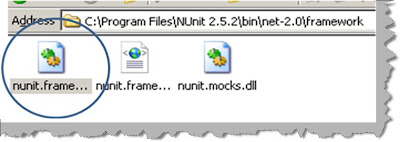

Step 3:- Add reference to the NUNIT and your invoice project in your code.
using NUnit.Framework;
using Invoice;


Step 4:- We need to create a simple class with ‘TestFixture’ as attribute. We then to create a method attributed with ‘Test’ which will have our test.
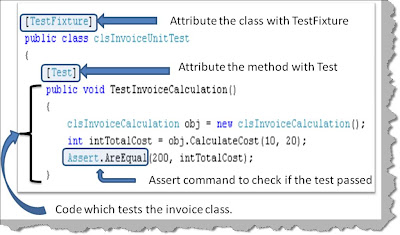

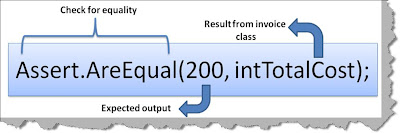
You can see in the above figure how the ‘TestInvoiceCalculation’ method creates a object of ‘clsInvoiceCalculation’ , passes the values and checks if the returned values has the expected results. ‘Assert’ command is used to check if the expected output and the results return match.

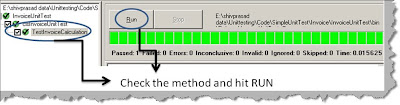
Step 5:- Once we are finished with our test case we need to compile the same to create a DLL. Once the DLL compilation is done go to program files – nunit and click on nunit. Now the nunit user interface will open. Click on file – open project and select your test DLL.

Once you select your DLL you will get a screen as shown below. On the right hand side you can see your test class with test function which has the test case. Check the test function and hit run. Now if the test case passes you will see a full green color or else you will see a red color with details of why the test case fails.

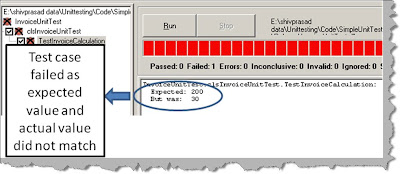
Screenshot when the test case fails.


How can we make NUNIT test cases data driven?

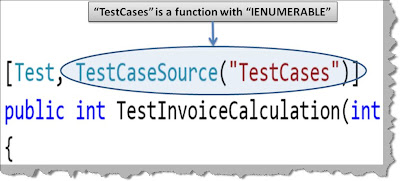
In the previous questions we had hardcoded the test data in the NUNIT test case itself. But in real time you would like to have test data inputs coming from a XML file or a database, in other words you would like to create data driven test cases. In order to create data driven in NUNIT we can attribute the unit test method with ‘TestCaseSource’ attribute as shown in the below figure. In ‘TestCaseSource’ we need to provide the function which will return the test case data, in this case it is ‘TestCases’.

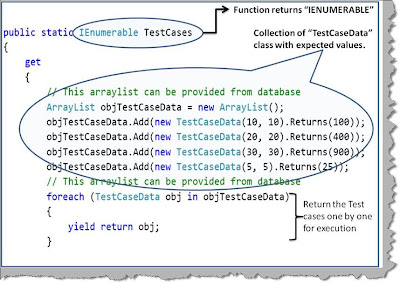
Below is the code snippet which provides dynamic data to unit test method. The function which is providing the dynamic data should return ‘IEnumerable’. NUNIT provides something called as ‘TestCaseData’ class. This class defines the test case data for NUNIT. The class provides ways by which you can specify input and the expected output from the test case.

Finally to return test case by test case we need to use ‘yield’ keyword with for each. You can see the below code snippet to understand how yield works.

How can we do unit testing using VSTS test?

If you do not have VSTS get the beta @
http://www.microsoft.com/downloads/details.aspx?FamilyID=255fc5f1-15af-4fe7-be4d-263a2621144b&displaylang=en

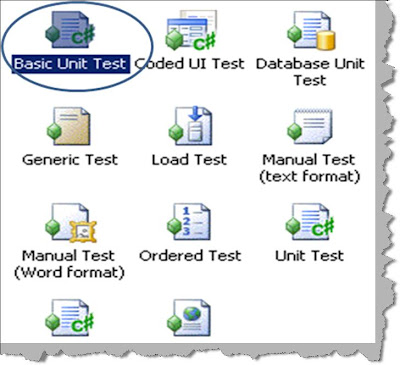
In order to do unit testing using VSTS right click on the visual studio solution explorer and select add new project. In the test project right click and select add new test you should be popped with a dialog box as shown in the below figure. From the dialog box select ‘Basic Unit test’.

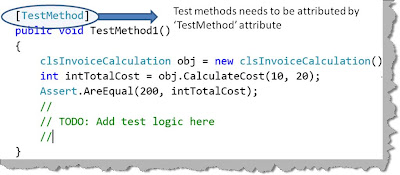
In order to create a function which will execute our unit test you need to attribute the function with “[TestMethod]”. If you remember in Nunit it was ‘[Test]’. The assert function does not change.
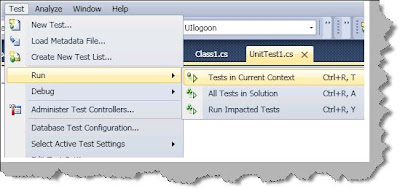
Once you have done the unit testing coding compile the same, click on test, run and select ‘Tests in the current context”.

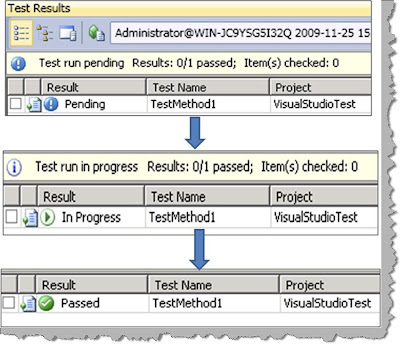
Once you do the previous test, the test starts running from pending to in progress and finally showing the results.
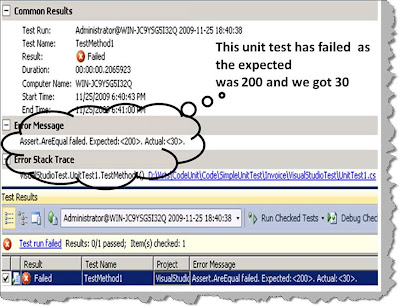
In case your test fails and you would like to see detail results of the same double click on the test to see a detailed result as shown below. The below results shows that the test failed because it was expecting “200” as the output and it got “30”.

How can we create data driven unit test using VSTS Test?

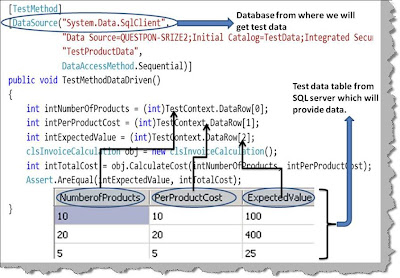
Creating data driven unit test is pretty simple in VSTS. First create a simple table with test data values. For instance you can see in the below figure we have created a table with 3 fields i.e. 2 input fields and 1 expected value. To consume this table apply ‘DataSource’ attribute with a proper database connection string as shown in the below figure.

To get field data from the table we can use the ‘DataRow’ with index.

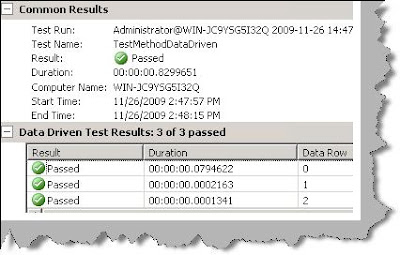
We have 3 test cases in the table, so when we executed the above test’s we got the below test results in our visual studio IDE result window.


How can we do automated testing using VSTS?

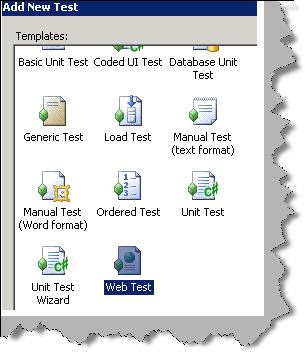
In order to do automate testing in VSTS we need use the ‘Web test’ template. So click on add new test and select ‘Web test’.

Once you have selected web test browser will open with a record, pause and stop button as shown in the below figure. Once you start posting and requesting, the URL recorder starts recording every request and response as shown in the below figure. On the right you can see how the recorder has recorded all the get and posts.
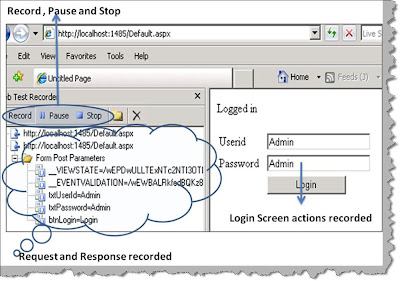

Below is a snapshot of simple login screen which is recorded. There are two requests, the first request is for the login page and the second request is when you post the login page with userid and password. You can see the values i.e. ‘Admin’ and ‘Admin’ in userid and password textboxes.
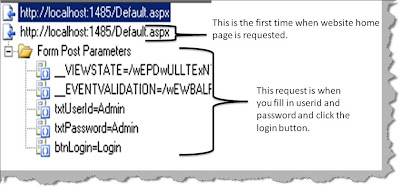

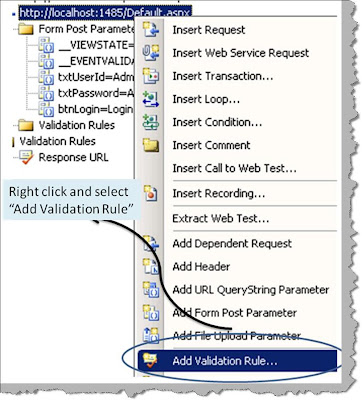
We will also need to define in which conditions the test will pass. Now right click on the second post and select ‘Add validation rule’ as shown in the below figure.

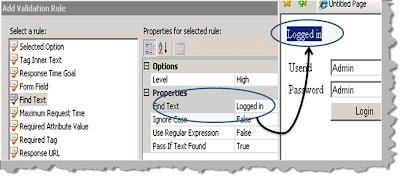
Select the rule saying if anywhere on the browser response we found ‘Logged in’ text that means that the test is passed.


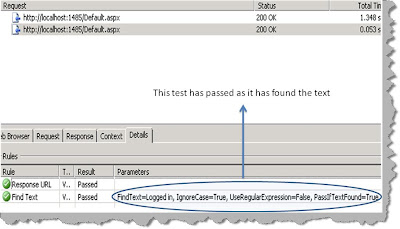
If you run the test you will get the executed values with the test specifying it’s a pass or fail.


How can we make the automated test data driven in VSTS?

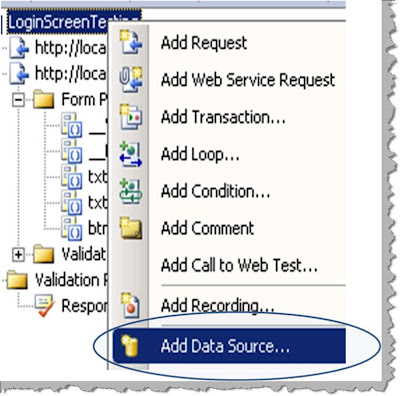
Once you have created the web test, right click on the web test and click add data source as shown in the below figure.


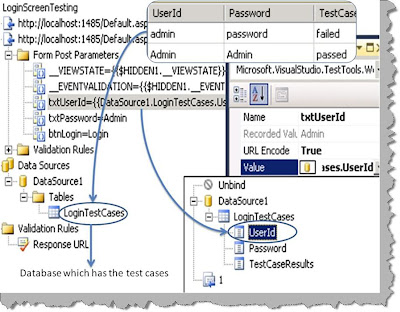
 Once you have added the data source you can then specify the database fields as inputs to the text boxes as shown in the below figure.

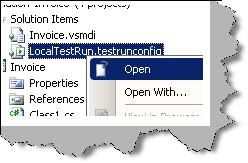
We need to perform one more step to ensure that the data driven test runs fine. Right click on the testrunconfig file and select one per data row as shown in the next figure.
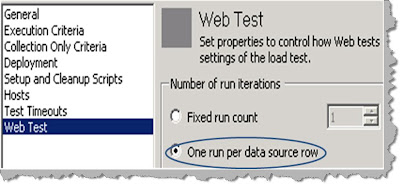


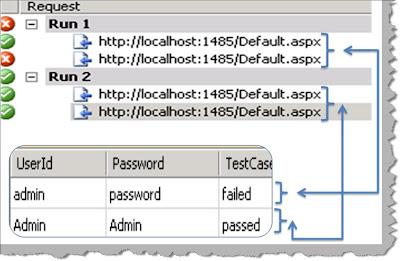
Once you are done you can run the test and see how VSTS picks up row by row test cases and executes the test. You can see in the below figure the first test case has failed while the second test case has passed.

How can we do coverage testing using VSTS?


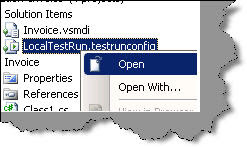
Code coverage is a 3 steps process as shown below. The first step is to
enable code coverage. So right click on the ‘.testrunconfig’ file in the
solution explorer as shown in the below figure.


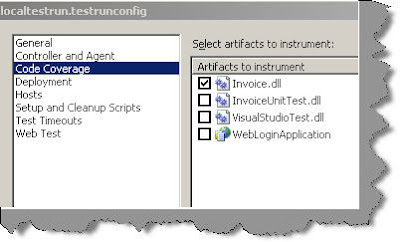
The next step is to select the assembly / DLL which we want to monitor for
code coverage, below is the figure which shows the same.


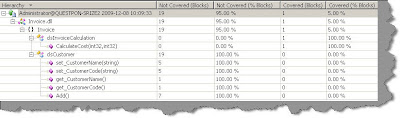
Once you run the test, right click on the test results and select code
coverage results. You will be shown a details result as shown below where you
can see which part of your application is covered and tested.


What are the different steps involved to execute performance test using VSTS?

I will be updating in 2 days the pictures are not fitting well.Coming soon…..

I have heard about Database testing in VSTS, what does it do?

I will be updating in 2 days the pictures are not fitting well.Coming soon…..


What is ordered testing?

I will be updating in 2 days the pictures are not fitting well.Coming soon…..