Thursday, October 20, 2011

C# interview questions: - What is the difference between “int” and “Int32” in C#?

What is the difference between “int” and “Int32” in C#?


for more .net and c# interview questions videos click on .NET and c# interview questions

.NET interview questions: - Uses of the Params Keyword in C#.

This is the one the typical .NET interview questions and also the favorable question of the interviewers.

Params: - The params keyword lets you specify a method parameter that takes an argument where the number of arguments is variable.

So, let’s take a scenario where we can have the use of the Params keyword.
Below is the scenario for the same.

    class Program
    {
        static void Main(string[] args)
        {
            int y = Add(10, 20);
            Console.WriteLine("The Addition of two Numbers is : " + y);
            Console.ReadLine();
        }
        static int Add(int Num1, int Num2)
        {
            return Num1 + Num2;
        }
    }

In the above code snippet you can see that I have created a function “Add”
which takes two parameters as “Num1” and “Num2” and return the addition of two numbers. The value for the 
parameters are been passed from the Main and it simply print the output to the screen of the “y” variable.

Now, simply just run your Application and will see the result like below diagram.


The above code snippet seems to be working fine but what if want to pass multiple arguments at a single instance. So, the Params Keyword helps us to achieve the above scenario in much better manner.

Let’s create a simple example to understand the use of Params Keyword in much better manner.
In order to perform practically you just need to follow the following steps.

Step1: - create a simple Console Application for that just open Visual Studio go to >> File >> New >> Project >> Windows >> Select Console Application.


Step2: - Now, simply just add the below Code Snippet in to Program.cs file of your Console Application.


    class Program
    {
        static void Main(string[] args)
        {
//Passed 5 different values.
            int y =  Add(10,20,30,40,50);
            Console.WriteLine("The Addition of  Numbers are : " + y);
            Console.ReadLine();
        }
//Created a listNumbers variable as declared as Params.
        static int Add(params int[] listNumbers)
        {
            int Total = 0;
            foreach (int i in listNumbers)
            {
                Total = i + Total;
            }
            return Total;
        }
    }

In the above code snippet you can see that I have created a function “Add” with a Variable “listNumbers” declared using params.

Now, simply just run your Console Application and will see the result like below diagram.


In the above diagram of output you can see the addition of the five numbers using params keyword.

If not understood from the above article, then see the following video on params keyword: -


Get our articles on  Most asked Dotnet interview question for preparation.

Regards,

See author’s other important Dotnet interview questions

Wednesday, October 19, 2011

Learn .NET in 60 days - Day 1

This class is for beginners who want to learn .NET.

for more .net and c# interview questions videos click on .NET and c# interview questions
Test yourself for Sharepoint 2010 interviews

This test will help you to check if u will ready for Sharepoint 2010 interviews,try to get 100% marks to ensure you are completely ready.

Best of luck


for more .net and c# interview questions videos click on .NET and c# interview questions

.NET and c# interview question practice test - 1

.NET and c# interview question practice test.
for more .net and c# interview questions videos click on .NET and c# interview questions

ASP.NET interview questions test :- ASP.NET Page life cycle

Arrange the page life cycle sequence in a proper manner. Hint :- SILVER
for more .net and c# interview questions videos click on .NET and c# interview questions

C# and .NET interview questions: - Explain with practical Lambda Expression in C#?

Lambda expression: - A Lambda expression is an anonymous function that can contain expressions and statements, and can be used to create delegates or expression tree types.
In simple words Lambda expression is nothing but it is an extended version of delegates or in other words it making delegates simpler.

All Lambda expression uses the lambda operator (=>).

The left side of the lambda operator specifies the input parameters (if any) and the right side hold the expression or statement block.

Let’s create a simple example to understand the concept of Lambda expression in much better manner.

In order to see it practically you just need to follow the following steps.

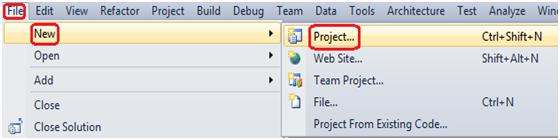
Step1: - Create a simple Console Application for that just open Visual Studio >> go to >> File >> New >> Project >> Windows >> Select Console Application.

lambda


lambda
Step2: - Now, simply just add the below code snippet in to program.cs file of your Console Application.
class Program
 {
     //created a delegate.
     delegate void PointToCallMe(string str);
     static void Main(string[] args)
     {
         //Delegate,which points to the CallMe Function.
         PointToCallMe objDelegate = new PointToCallMe(CallMe);
         objDelegate.Invoke("Called from Delegate");
         Console.ReadLine();
     }
     public static void CallMe(string str)
     {
         Console.WriteLine(str);
     }
 }
In the above code snippet you can see that I have created a function CallMe with a string parameter “str” and I have created a delegate which points toward the CallMe function.
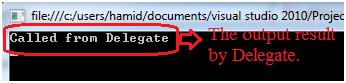
Now, simply just run your console application and you should see the result as shown in the below diagram.
lambda

The above code is nice it work’s properly but the concern here is the code complexity; you can see that for a simple line of output we have created extra function, which makes your code little lengthy and not very easy to read.
So Lambda Expression helps us to solve the above problem in simplified manner and making our code more readable and understandable.
Let’s see how exactly Lambda Expression help to solve the above problem for that you just need to follow the following step.
Step3: - Now, just simply modify the program.cs file like below code snippet.
    class Program
 {
     //created a delegate.
     delegate void PointToCallMe(string str);
     static void Main(string[] args)
     {
         //Lambda Expression.
         PointToCallMe objLambda = str => Console.WriteLine(str);
         objLambda.Invoke("Called from Lambda");
         Console.ReadLine();
     }
 }
Now, in the above code snippet you can see that I have just eliminated the extra created CallMe function and just written a few line of Lambda Expression, which makes your code more readable and understandable with a few line of code.
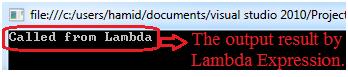
Now, simply just run your console application and will see result like below output diagram.

lambda
Watch the following interesting video on threading in C#.NET: -


Get our more important Dotnet interview questions  materials.

Regards,

Visit more author's other Most asked Dotnet interview question