Anonymous Type: - Anonymous Types help us to create an object without declaring its data type and also help us to create properties with good meaningful names. Since the name of the data type is not specified that the type is referred to as an Anonymous Type.
Let’s first see in what kind of scenario Anonymous Type are applicable.
Suppose we have a simple string which has Customer’s, FirstName, MiddleName, LastName and PhoneNumber like below code snippet.
Now, you would like to parse the data and take the data in to individual variables like below code snippet.
In order to parse data into individual variables, we have to create a function with “Out” parameters and have to use “Split” function like below code snippet.
Still now we have done with parsing the data.
Now just invoke this function from the main class like below code snippet.
ParseData(str, out strFirstName, out strMiddleName, out strLastName, out PhoneNumber);
Now, let just display the result for that just add the below code snippet.
Let’s see how the result set look like.

The above code is nice its work’s properly but the concern here is the code tidiness, in current scenario all the variables are individual variables in case if you want to parse the data around it would be very tedious job to do and it would make your code very lengthy and not be very easy to read.
So Anonymous Type helps to solve the above problem in simplified manner and making our code more readable and understandable.
Let’s see how exactly Anonymous Type help to solve the above problem for that you just need to follow the following steps.
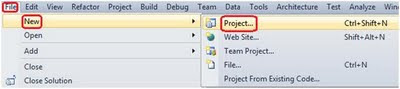
Step1: - create a new project Console Application for that Go To > New
> File > Project > Windows > Select Console Application.

Step2: - create a string variable containing data like below code snippet.
In the above code snippet you can see that we have created an Anonymous Type
with FirstName, MiddleName, LastName, PhoneNumber and this is getting type
casted to object because we cannot return Anonymous Type object outside the
function straight forward. We need to type caste it like below code snippet.
Step4: - Now receive Anonymous Type in the main class like below code snippet and also display.
In the above code snippet as soon as you type CustomerInformation(.)(dot) the VS business intelligence will show properties like below diagram.

Now just run your application and will see the result like below diagram.

Also view following video on why anonymous types are better than tuples.
Get our tutorials on interview questions and answers for .NET
Regards,
Visit for author’s more blog on Most asked Dotnet interview questions
Let’s first see in what kind of scenario Anonymous Type are applicable.
Suppose we have a simple string which has Customer’s, FirstName, MiddleName, LastName and PhoneNumber like below code snippet.
string str = "Feroz S Shaikh 966457"; // Here you can see that the Customer's

Name and Phone Number are Seperated by (‘ ’)spaces.
Now, you would like to parse the data and take the data in to individual variables like below code snippet.
string strFirstName = "";//this variable will hold Customer FirstName.

string strMiddleName = "";//this variable will hold Customer MiddleName.

string strLastName = "";//this variable will hold Customer LastName.

double PhoneNumber = 0;//this variable will hold Customer PhoneNumber.
In order to parse data into individual variables, we have to create a function with “Out” parameters and have to use “Split” function like below code snippet.
static void ParseData(string strData, out string strFirstName, out string

strMiddleName, out string strLastName, out double PhoneNumber)
{

string[] ArrayData = new string[3];//Created Array with Size 3.

ArrayData = strData.Split(' ');//Used Split function to split the data.


strFirstName = ArrayData[0];//Passed the data to strFirstName.

strMiddleName = ArrayData[1];//Passed the data to strMiddleName.

strLastName = ArrayData[2];//Passed the data to strLastName.

PhoneNumber = Convert.ToDouble(ArrayData[3]);//Passed the data to PhoneNumber.

}
Still now we have done with parsing the data.
Now just invoke this function from the main class like below code snippet.
ParseData(str, out strFirstName, out strMiddleName, out strLastName, out PhoneNumber);
Now, let just display the result for that just add the below code snippet.
Console.WriteLine("FirstName :" + strFirstName);

Console.WriteLine("MiddleName : " + strMiddleName);

Console.WriteLine("LastName : " + strLastName);

Console.WriteLine("PhoneNumber : " + PhoneNumber.ToString());

Console.ReadLine();
Let’s see how the result set look like.
The above code is nice its work’s properly but the concern here is the code tidiness, in current scenario all the variables are individual variables in case if you want to parse the data around it would be very tedious job to do and it would make your code very lengthy and not be very easy to read.
So Anonymous Type helps to solve the above problem in simplified manner and making our code more readable and understandable.
Let’s see how exactly Anonymous Type help to solve the above problem for that you just need to follow the following steps.
Step1: - create a new project Console Application for that Go To > New
> File > Project > Windows > Select Console Application.
Step2: - create a string variable containing data like below code snippet.
string str = "Feroz S Shaikh 966457";Step3: - create an Anonymous Type like below code snippet.
static object ParseData(string strData)

{

string[] ArrayData = new string[3];//Created Array with Size 3.

ArrayData = strData.Split(' ');//Used Split function to split the data.

//Creating Anonymous Types on the fly.

return new {

FirstName = ArrayData[0],

MiddleName = ArrayData[1],

LastName = ArrayData[2],

PhoneNumber = Convert.ToDouble(ArrayData[3])};

}
In the above code snippet you can see that we have created an Anonymous Type
with FirstName, MiddleName, LastName, PhoneNumber and this is getting type
casted to object because we cannot return Anonymous Type object outside the
function straight forward. We need to type caste it like below code snippet.
static T Cast<T>(object obj, T type)

{

return (T)obj;

}
Step4: - Now receive Anonymous Type in the main class like below code snippet and also display.
var CustomerInformation = Cast(ParseData(str),new

{FirstName="",MiddleName="",LastName="",PhoneNumber=0});

//assigned the data.

Console.WriteLine("FirstName :" + CustomerInformation.FirstName);

Console.WriteLine("MiddleName : " + CustomerInformation.MiddleName);

Console.WriteLine("LastName : " + CustomerInformation.LastName);

Console.WriteLine("PhoneNumber : " + CustomerInformation.PhoneNumber);

Console.ReadLine();
In the above code snippet as soon as you type CustomerInformation(.)(dot) the VS business intelligence will show properties like below diagram.
Now just run your application and will see the result like below diagram.
Also view following video on why anonymous types are better than tuples.
Get our tutorials on interview questions and answers for .NET
Regards,
Visit for author’s more blog on Most asked Dotnet interview questions


